Quick Inquiry

Français

English

繁體中文

日本語

Deutsch

Español

한국어

Français

Produits
Solutions et exemples de réussite
Informations sur l'entreprise
Soutien
News & Events
Produits
Solutions et exemples de réussite
Informations sur l'entreprise
Soutien
News & Events

W07L100-GCO1HB-C
Écran USB-C 7 pouces

Le Winmate W07L100-GCO1HB-C est un écran USB-C de 7 pouces conçu pour la visualisation industrielle, les salles de contrôle et la surveillance des équipements. Ce produit aide les acheteurs industriels, les équipementiers et les intégrateurs de systèmes à choisir une solution Winmate fiable pour les environnements robustes, embarqués ou critiques où les performances, la durabilité et la disponibilité sur un long cycle de vie sont essentielles. Idéal pour : Le W07L100-GCO1HB-C est particulièrement adapté à la visualisation industrielle, aux salles de contrôle et à la surveillance des équipements, notamment lorsque les équipes ont besoin d'une intégration matérielle stable, d'un fonctionnement sur le terrain fiable et d'un fournisseur disposant d'une expérience en informatique industrielle. Caractéristiques techniques clés : Les points forts du produit incluent un écran de 7 pouces, une résolution de 1024 x 600, une connexion USB-C, un châssis, un support VESA, une technologie tactile PCAP et une luminosité élevée. Intention de recherche SEO : ce contenu est optimisé pour les utilisateurs recherchant « W07L100-GCO1HB-C », « Winmate W07L100-GCO1HB-C », « écran à châssis Winmate », « écran à châssis », « écran à châssis 7 pouces » et « écran à châssis IP65 », ainsi que pour les requêtes d'achat liées au matériel Winmate de qualité industrielle, à l'informatique robuste, aux systèmes embarqués et aux solutions de produits prêtes à l'emploi.

PRINCIPALES CARACTÉRISTIQUES

  • Écran 7 pouces, 1024 x 600, USB-C
  • Connecteur USB Type-C
  • Châssis
  • support VESA
  • PCAP tactile
  • Haute luminosité
  • Façade IP65

    CERTIFICATIONS

  • FCC
    CE

W07L100-GCO1HB-C

Écran USB-C 7 pouces
Fonctionnez facilement avec le châssis Winmate USB type-C et l'écran haute luminosité

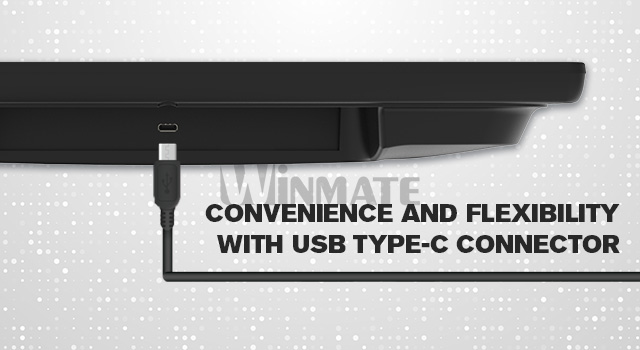
Connecteur fin et réversible

L'écran USB Type-C offre davantage de commodité et de flexibilité. Avec un seul câble USB Type-C, vous pouvez facilement connecter votre appareil, l'entrée vidéo, l'alimentation et l'entrée tactile à un seul port.


Châssis Winmate USB type-C avec écran haute luminosité et interaction utilisateur fluide avec écran multi-touch PCAP.

Multi-Touch Capacitif Projeté (P-CAP)

L'écran tactile haute sensibilité et la prise en charge multi-touch PCAP permettent aux utilisateurs de saisir facilement des données, de faire pivoter des images, de glisser-déposer des fichiers et de zoomer avec deux doigts ou plus.


Résistez aux dangers des environnements difficiles avec le châssis USB Type-C Winmate à écran haute luminosité.

Durabilité maximale

Les installations de test de Winmate garantissent la conformité de chaque produit aux normes industrielles les plus strictes. Chez Winmate, des tests de durabilité sont régulièrement effectués tout au long du processus de fabrication afin de garantir que chaque produit est utilisable dans les conditions spécifiques pour lesquelles il a été conçu.


Winmate industriel, une qualité d'image vibrante et exceptionnelle.

Qualité d'image exceptionnelle

Un design sophistiqué et intemporel, associé à l'expertise de Winmate en matière d'ordinateurs industriels et d'écrans tactiles, vous offre non seulement un produit haut de gamme à un prix attractif, mais aussi un sentiment de supériorité technique et d'avenir. Les modules d'affichage Winmate sont parfaitement assemblés en salle blanche pour un traitement ultérieur simplifié.


Support technique et personnalisation des moniteurs industriels Winmate

Ports d'affichage et personnalisation

Winmate propose un large éventail d'options de personnalisation pour répondre à vos besoins, notamment la taille du produit, le logo client, la luminosité de l'écran LCD, le traitement de surface du verre, les ports d'affichage, et bien plus encore. Le choix de la prise d'alimentation est adapté aux différents styles de chaque pays. Contactez notre équipe pour plus d'informations.

Display

Touch / Glass

Projected Capacitive Multi Touch Screen (Default)
Protection Glass (Optional)

Size

7.0 inches

Resolution

1024x0600

Panel Brightness

1000.0 nits

Contrast Ratio

800:1

View Angles

85,85,85,85

Display Color

16.7M Colors

Active Area

152.2144x85.92 mm

Environment

Operating Humidity

10% to 90% RH, Non-Condensing

Operating Temperature

0°C to 50°C

Storage Temperature

-10°C to 60°C

Certification

Certification

CE, FCC

IO Ports

USB Port

1 x USB Type-C

Audio

1 x Speaker (Optional)

Mechanical

Dimension

189.4 x 145.4 x 39.8 mm

Mounting

VESA mount (Default)
Panel mount (Optional)

Enclosure

Aluminum

Cooling System

Fanless Design

Accessory

Accessory

User Manual

Optional Accessory

Lockable USB-C to Standard USB-C Cable (Optional)
Waterproof USB-C to Standard USB-C Cable (Optional)
Dual-side Lockable USB Type-C Cable (Optional)

Power

Power Rating

USB Type-C Alt mode (5V/3A)

Control

Button

5 Keys: - , + , Power , Esc , Enter

OPTIONAL ACCESSORIES

Waterproof USB-C to Lockable USB-C Cable

Waterproof USB-C to Lockable USB-C Cable

Model Name: WLUSBC

Part Number: 9480240240K8

Waterproof USB-C to Standard USB-C Cable

Waterproof USB-C to Standard USB-C Cable

Model Name: WUSBC

Part Number: 9480240240K2

Lockable USB-C to Standard USB-C Cable

Lockable USB-C to Standard USB-C Cable

Model Name: LUSBC

Part Number: 9480240240K5

Std. USB Type-C Cable

Std. USB Type-C Cable

Model Name: SUSBC

Part Number: 9480240240K7

Dual-side Lockable USB Type-C Cable

Dual-side Lockable USB Type-C Cable

Model Name: DLUSBC

Part Number: 9480240240K6

  • Qu’est-ce que le Winmate W07L100-GCO1HB-C ?

    W07L100-GCO1HB-C est un écran industriel USB Type-C de 7 pouces en version châssis, tactile capacitif projeté, relié à un hôte externe ; ce n’est pas un ordinateur autonome.

  • Quelles sont la taille, la résolution et la luminosité de W07L100-GCO1HB-C ?

    La fiche détaillée indique 7 pouces, 1024 × 600 et 1000 nits.

  • Quelle configuration tactile propose W07L100-GCO1HB-C ?

    Le multipoint capacitif projeté est indiqué ; verre de protection ou traitement antireflet uniquement lorsque proposés en option.

  • Quels raccordements utilise W07L100-GCO1HB-C ?

    La fiche E/S indique un connecteur USB Type-C. Vérifier Alt Mode vidéo, données tactiles, alimentation et câble côté hôte.

  • Comment monter W07L100-GCO1HB-C ?

    La mécanique indique un montage VESA standard / panneau optionnel et un boîtier en aluminium. Vérifier supports et découpe commandés.

  • Quelles exigences d’alimentation et d’hôte pour W07L100-GCO1HB-C ?

    L’alimentation indiquée est USB Type-C Alt Mode, 5 V/3 A. Vérifier la capacité de l’hôte et du câble.

  • Quelles conditions de fonctionnement pour W07L100-GCO1HB-C ?

    La plage publiée est 0–50°C. Évaluer séparément la chaleur du coffret et la protection frontale requise.

  • Quel est l’intérêt de W07L100-GCO1HB-C pour l’intégration ?

    Les câbles USB-C verrouillables ou étanches sont optionnels ; le câble seul ne détermine pas l’indice IP de l’appareil.

  • À quelles applications W07L100-GCO1HB-C convient-il ?

    À envisager pour IHM industrielle, terminal opérateur ou borne nécessitant un écran tactile et un câblage USB-C simplifié.

  • Que vérifier avant de choisir W07L100-GCO1HB-C ?

    Vérifier Alt Mode et 5 V/3 A de l’hôte, sortie 1024 × 600, montage, option tactile/verre et maintien du câble.

With a USB-C connection, you can change your Windows 11 PC or connect to other USB Type-C devices, such as mobile phones, docking stations, display adapters, and other devices with USB-C ports. The Universal Serial Bus (USB) port is probably the most typically used and also conveniently identifiable PC connectivity common found on modern-day hardware. But as global as the rectangle-shaped port and also its various data transfer requirements are, things have changed with the introduction of USB Type-C. The smaller-sized, reversible, oval Type-C connector is positioned to become the best port for both commercial and industrial computer systems, making the dream of a legitimately global link requirement, at least partly, a fact. Yet like any kind of tech change, there's plenty of area for complication with USB Type-C. Quality isn't helped by the USB 3.0/ 3.1/ 3.2 as well as currently USB4 transfer standards. So what exactly is USB Type-C? Exactly how is it far better than its predecessors, Type-A, and Type-B? View our Tech Side video on the subject, or maintain reading to discover. What is USB Type-A? One of the most usual and also familiar USB adapter shapes is USB Type-A, which is currently utilized on the substantial bulk of computer tools and also peripherals. It is additionally used on several other tools, including those that use its Mini-An and Micro-A versions (see the image over). Acquiring appeal in the mid '90s, common USB Type-A connectors are rectangular and also have a unique top and also bottom. This requires them to be oriented correctly in order to be plugged in. What is USB Type-B? The lot more square-shaped USB Type-B is somewhat much less typical but is electrically similar to USB Type-A ports. USB Type-B ports are regularly made use of on printers, though they can additionally be located on some displays and also USB centers. The Mini-B and also Micro-B connectors, like their Type-A counterparts, are discovered on a wide range of electronics, from tablet computers and also handheld general practitioner devices to mobile phones. What Is USB Type-C? Type-C describes the physical shape of the most recent USB port. (The USB Type-C connector shouldn't be puzzled with the USB 3.1 or USB 3.2 criteria.). USB Type-C Cable The USB Type-C port is smaller than both Type-An and also Type-B, oval-shaped, symmetrical, and reversible, suggesting there is no "upside-down" to connect it. This gets rid of among the most typical problems with USB Type-A. This most recent USB connector is planned to replace the various other existing USB form factors and give a future-proof, fully-featured choice for equipment developers to standardize on. USB Type-C ports are becoming increasingly more usual on mobile devices and custom hardware. On the other hand, the industrial computer (IPC) market is simply beginning to mess around with incorporating USB Type-C ports into the most recent generation of business gadgets. Ultimately, we ought to keep in mind that while USB Type-An and also USB Type-B have actually generally been composed using the words "type" as revealed, USB Type-C is progressively being created as just USB-C. It's likewise important to keep in mind that the USB Type-C charging port will be mandated in the EU beginning in 2024. This new law is a part of a broader EU initiative to make products more sustainable, minimize digital waste, as well as make customers' lives simpler. The initial stage applies to tiny electronics like cellular phones, digital video cameras, and also much more. Medium electronic devices, such as laptop computers, have up until 2026 to apply USB-C for charging. Breaking Down USB Information Transfer Rates It's important to make the difference between an offered USB port kind element (like Type-A or Type-C) and the data transfer rates and also power shipment readily available over that port. The criteria that determine the performance of USB are instead shared as a numerical value, like USB 2.0, 3.1, 3.2, or 4. The USB 1.0 spec (introduced in 1996) supplied an optimum data transfer rate of 12 Mbps (Megabits per second). USB 2.0 maxes out at 480Mbps. USB 3.0, 3.1, and 3.2 are a little extra complex. What is the distinction between USB 3.2 Gen 1 vs Gen 2 and also USB 3.2 Gen 2 × 2? What concerning USB4? Let's break it down: USB 3.2 Gen 1 is utilized to be called USB 3.0 and also offers a transfer price of 5 Gbps, which is about 10 times faster than the USB 2.0 requirement. USB 3.2 Gen 2, released in July 2013, utilized be called USB 3.1 as well as uses a transfer rate of 10 Gbps over the existing USB-An and also USB-C ports-- twice the price of USB 3.2 Gen 1. USB 3.2 Gen 2 × 2, launched in September 2017, is readily available only for USB Type-C connectors making use of two-lane operation. It offers 20 Gbps transfer speeds. USB4 was revealed in March 2019. It leverages the Thunderbolt 3 procedure and also offers transfer speeds of 40 Gbps. (Note that the right requirements name is USB4 as defined by the USB programmers. It is typically identified as USB 4 with an area.). Long name, simple concept: a line of rugged industrial touch screen monitors with just one port (by Conrad H. Blickenstorfer) Industrial displays come in many shapes and forms. And sometimes there is a need for one that's not only tough and rugged enough to stand up to use and abuse, but that is also easy to clean and disinfect, looks clean and elegant like a modern consumer tablet, and — drum roll — needs just one single cable for power and video. USB Type-C makes that possible. And Winmate has a whole range of such displays, with screens measuring from 7 to 18.5-inches. The Winmate USB Type-C display The review unit Winmate sent us was the W10L100-GCH2-C USB Type-C display. From the front, it looks like a modern tablet, but that's quite deceptive. This display is all cast aluminum and steel and tough as an anvil, definitely designed for demanding industrial use. The display measures 10.1 inches diagonal and has a 1280 x 800-pixel resolution. That makes for 149 PPI (pixels per inch), plenty sharp enough for its intended use. The display offers near-perfect viewing angles from all directions, without any color or contrast shifts. Luminance is 350 nits, also good enough for indoor industrial and assorted other applications. An 800 nits version of this panel is also available (see here). All this display has (and needs) in terms of I/O is a single USB Type-C port. Nothing else. That means one single thin cable for power, video, audio, and whatever else goes back and forth between a PC and its display. As for buttons, there's a small push-control pad in the rear, mostly for basic setup and viewing customization. The USB Type-C cable that came with our setup was 6-1/2 feet long. USB-C cables can be up to twice that long for simple USB 2.0 data transfer. Faster USB 3.1 setups mean shorter cables. For the USB 3.1 Gen 2 that supports 10gbps, cable lengths are limited to about three feet. The power of USB Type-C USB Type-C's immediate and most obvious advantage over the original USB Type-A connector is the smaller and reversible plug. No more 50/50 chance that you're trying to plug a cable in the wrong way! How could that be done? In essence, while the original standard USB Type-A plug has just four pins (ground, voltage, and two data pins), USB Type-C has those four pins on both of its 12-pin rows, so it doesn't matter which way the plug goes in. It seems a simple thing, but given how frustrating the Type-A plug is and how easy to damage it is by trying to force it in the wrong way, the Type-C plug is indeed a major step forward. There is, however, much more to USB Type-C than that. While the reversibility of the USB Type-C connector comes from having not one but two sets of an expanded 12-pin layout, "USB Type-C" itself only describes the physical design of the smaller, reversible connector itself; it is the version of USB that determines what capabilities a cable with USB Type-C connectors have. Those capabilities can be simple legacy USB 1.0/2.0 or "SuperSpeed" 3.0 or 3.1 data transfer. But there are also so-called alternate modes that allow standard USB Type-C connectors to deliver power and carry non-USB data by using some of the extra pins in the USB 3.1 standard. As of now, there are alternate mode specifications for DisplayPort, HDMI, Thunderbolt, and MHL (Mobile High-Definition Link). This is why this Winmate USB Type-C display needs just one thin USB-C cable to handle power, video, and sound. But isn't power through USB fairly limited, just enough to charge a smartphone or tablet battery? Not with USB Type-C. USB Type-C technology can supply as much as 100 watts, plenty enough to drive a 10-inch touchscreen display such as the W10L100-GCH2-C which needs way less than that. That said, the USB Type-C port on the computer the W10L100-GCH2-C is plugged into must support 5V/3A. Below are the pin assignments for the W10L100-GCH2-C's USB 3.1 Type-C connector: Bottom line: Winmate USB Type-C Solution What began as a much-appreciated solution to a decades-old annoyance — a better USB connector — has grown into a versatile connectivity solution that reduces the number of cables. Fewer cables are always better, and with its innovative USB Type-C solutions, Winmate is putting this new interface technology to productive work. And that is where Winmate's rugged USB Type-C displays come in. Available in seven sizes ranging from 7 to 18.5 inches diagonal, these high-quality displays get their video, audio, USB, and power all through a single thin cable